+91 91524 45255

TCP/IP Protocol Suite

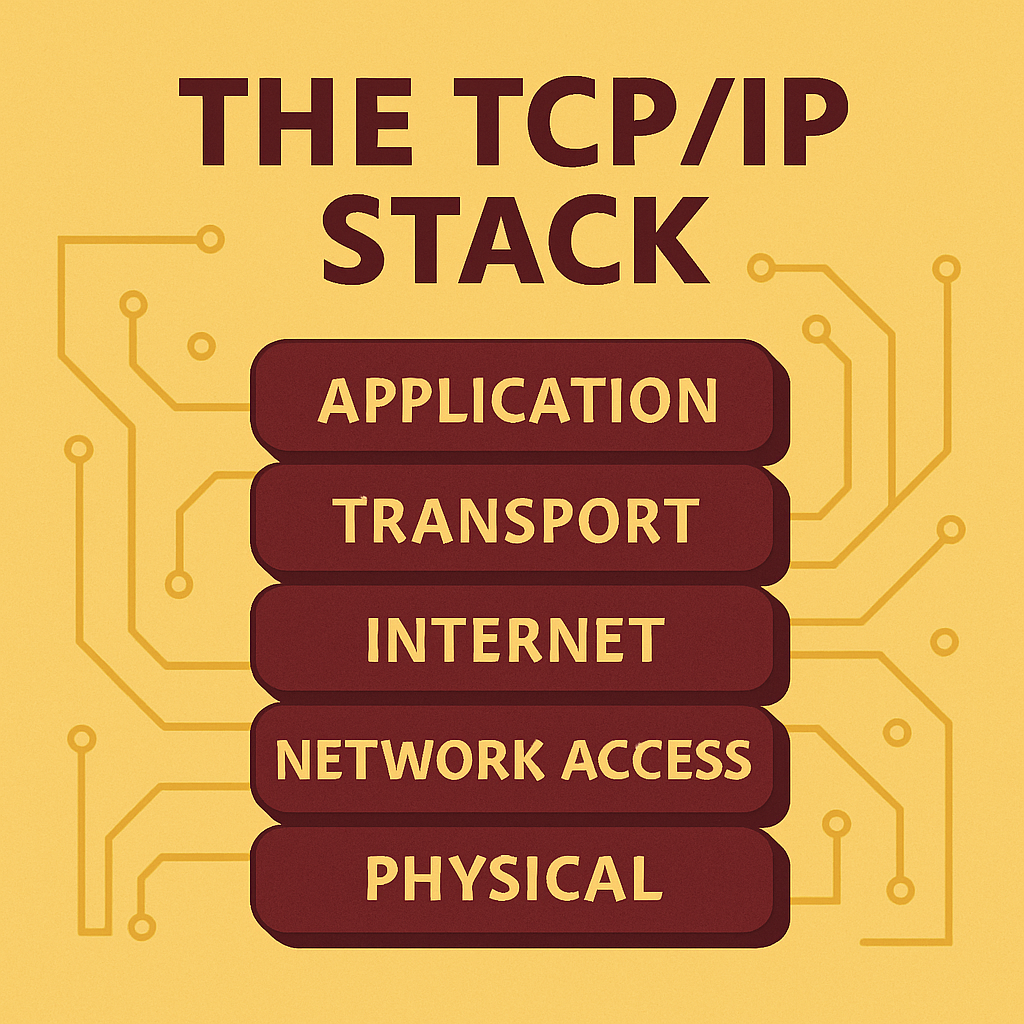
TCP/IP, short for Transmission Control Protocol/Internet Protocol, is the foundational suite of protocols that defines how data is transmitted across interconnected networks, including the Internet. It's not a single protocol, but a structured set of layered protocols that handle everything from application level communication to physical data transmission.

TCP/IP Stack

What Is TCP/IP and Why It Matters

TCP/IP, short for Transmission Control Protocol/Internet Protocol, is the foundational suite of protocols that defines how data is transmitted across interconnected networks, including the Internet. It's not a single protocol, but a structured set of layered protocols that handle everything from application level communication to physical data transmission.

1

Historical Development

Originally developed in the 1970s by the U.S. Department of Defence, TCP/IP was designed for resilient, fault tolerant communication between heterogeneous computer systems. It became the standard for ARPANET internet's early predecessor and was formally adopted for all internet-based communication in 1983.

2

Universal Structure

The importance of TCP/IP lies in its universality and structure. It enables information to travel from one application on one machine to another application on a different machine across routers, switches, cables, wireless links, and different operating systems. It ensures the addressing, packaging, delivery, and verification of data.

3

Complete Communication Model

Unlike isolated protocols like TCP or IP alone, TCP/IP is a complete communication model. It handles:

  • Data formatting at the application layer,
  • Reliable transport at the transport layer (via TCP or UDP),
  • Routing and addressing at the internet layer (via IP), and
  • Physical transmission over network media.

Whether it's loading a webpage, sending an email, or streaming a video, TCP/IP is the framework that makes it all work efficiently, reliably, and at scale.
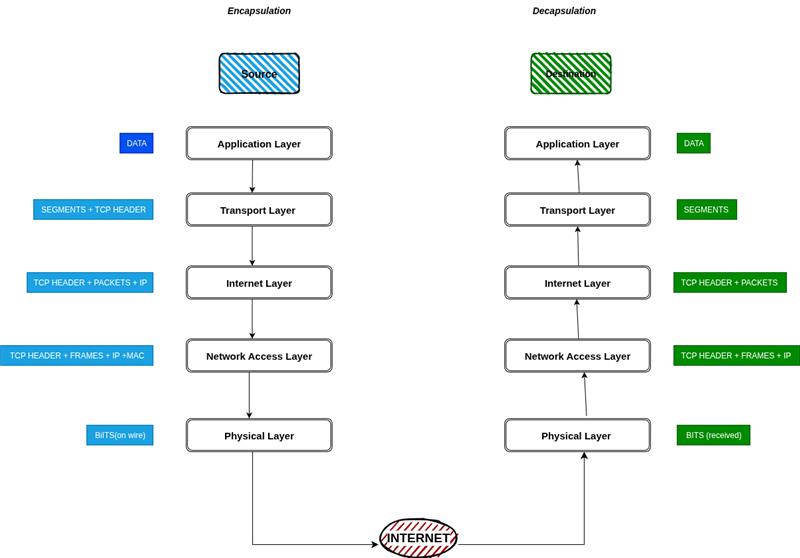
OSI diagram
4

TCP + IP Synergy

Using TCP with IP creates a system where:

  • IP finds the destination.
  • TCP ensures the message is delivered completely, in order, and without errors.

This combo gives us:

  • Reliable file transfers
  • Accurate web page loading
  • Functional remote logins
  • Resilient, end-to-end communication over unreliable networks

Application Layer: Where It Begins

Everything starts at the Application Layer. This is where the user interacts with the network through a web browser, email client, or file transfer program. When a user takes an action like typing a website URL, the program generates data to send. This data is passed to the transport layer using a specific port number. Each protocol has its own port:

Protocol Examples

HTTP: Port 80, HTTPS: Port 443, DNS: Port 53

Port Function

The port number helps the receiving machine understand which service should process the incoming data.

Transport Layer: Breaking It Down

Once application data reaches the Transport Layer, TCP takes over (if a reliable connection is required). TCP divides the data into smaller pieces called segments. Each segment is given a header containing sequence numbers and error-checking information.

1

TCP Segmentation

These headers allow the receiving device to verify that all segments arrived, and that they can be reassembled correctly. If any data is missing or corrupt, TCP requests a retransmission.

2

Reliability vs Speed

TCP provides reliable delivery, while UDP offers faster transmission without guarantees. The choice depends on the application's requirements.

Internet Layer: Finding Destination

Now data segments are passed to the Internet Layer. Here, each segment is wrapped in an IP packet. The IP header contains the source and destination IP addresses.

1

IP Routing

The role of the Internet Layer is to choose the best path to route these packets to their destination, even across multiple networks.

Network Access Layer: Hardware-Level Delivery

At this point, the IP packets move to the Network Access Layer (also called the Data Link Layer). This is where MAC addresses are attached - hardware identifiers unique to each device on a local network.

1

Local Network Delivery

This ensures that the data reaches the correct physical machine at the destination network. The data is now prepared for transmission through physical media.

Physical Layer: The Actual Transmission

The data, now formatted as electrical impulses, light pulses, or radio waves, travels over physical connections like cables, fiber optics, or wireless signals. This is the only layer that actually moves bits across space from one machine to another.

Transmission Methods

Ethernet cables, fiber optic transmission, wireless radio waves.

Signal Types

Digital signals converted to electrical, optical, or radio waves.

Encapsulation and Decapsulation: Wrapping and Unwrapping Data

At each layer of the TCP/IP model, headers are added to the data. This is called encapsulation. Each header contains information relevant to its layer's function like port numbers at the Transport Layer, IP addresses at the Internet Layer, and MAC addresses at the Network Access Layer.

1

Layer-by-Layer Process

As data travels from the sender's application to the physical wire, it gets wrapped in more and more headers. At the destination, the reverse happens: each layer strips its respective header and passes the content upward. This process is called decapsulation.

2

Real-World Example

So when you load a webpage, here's what really happens:

Data Flow:

  • Your browser sends data to port 80 (HTTP)
  • TCP breaks it into segments and adds sequence and error-check headers
  • IP adds addresses and determines routing
  • MAC adds local hardware addressing
  • Data is transmitted as electrical/radio/light signals
  • At the receiving end, each layer strips its header and passes content upward
  • The destination application reconstructs and displays the webpage

Conclusion

Understanding the TCP/IP stack as a layered model shows how every piece of internet communication is methodically structured from user action to hardware transmission. Encapsulation and decapsulation are the mechanisms that let machines cooperate across networks, hardware, and software boundaries.

Key Benefits

Reliable communication, universal addressing, and structured data flow.

Practical Applications

Web browsing, email, file transfers, and streaming media.

We've now unpacked the model that defines how everything on the internet, from emails to video calls, moves. This isn't just theory; it's the framework behind every digital interaction you encounter.

See you soon in the next blog, where we'll continue building on this foundation.

Ready to Master TCP/IP?

Contact us for advanced network security assessments and protocol analysis.

GET ASSESSMENT