+91 91524 45255

Firmware Analysis

Now that we've successfully dumped the .bin file from the SPI flash chip, the next step is to analyze it. This process helps uncover the contents of the firmware like file systems, configuration files, scripts, and potentially sensitive data.

Firmware analysis

Basic File Identification

Before doing any advanced analysis, we identify what type of file we're dealing with using the file command:

File Classification:

file TL-WR840N.bin

This gives us a basic classification whether it's just data, a compressed archive, or contains a known file system like SquashFS. We'll need deeper inspection to understand its structure.

File identification

Extracting Readable Strings

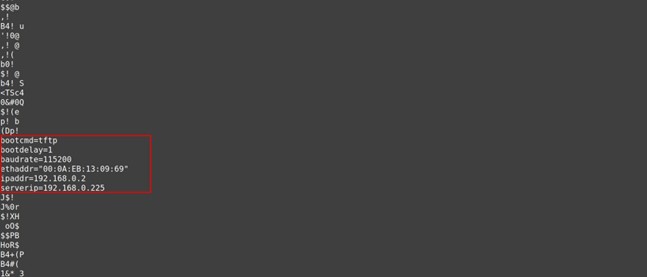
Sometimes firmware contains plain-text strings (e.g., usernames, URLs, or paths). To extract them:

String Extraction:

strings TL-WR840N.bin | less

Key Findings

Extracts readable content embedded in binary, including references to system files and configurations.

Common Discoveries

BusyBox (lightweight Linux utility), default IP addresses like 192.168.0.1, filesystem paths like /etc/config or /bin/sh.

String extraction

Exploring with Binwalk

Next, we use Binwalk, a powerful tool to locate and extract embedded filesystems from binary blobs.

1

Install Binwalk

Installation:

sudo apt install binwalk
2

Run Binwalk

Command:

binwalk TL-WR840N.bin
Binwalk analysis

This creates a directory like _TL-WR840N.bin.extracted/ containing the extracted filesystem. You can explore it using normal commands.

Extracting Files

To extract these embedded filesystems automatically:

Extraction Command:

binwalk -e TL-WR840N.bin
File extraction

This creates a directory containing the extracted filesystem. You can explore it using normal commands.

Manual File System Browsing

Once extracted, you can:

View Configuration Files

Look inside configuration files like /etc/passwd or /etc/shadow.

Check for Scripts

Look for scripts in directories like /bin/ or /sbin/.

Automated Analysis with Firmwalker

If you want a quick automated overview, use Firmwalker, a script that scans extracted firmware directories for interesting files like:

Quick Scanning

Scans for passwords, SSH keys, URLs, and configuration files.

Security Analysis

Identifies potential vulnerabilities and security-related configurations.

1

Clone Firmwalker

Installation:

git clone https://github.com/craigz28/firmwalker.git
2

Run Firmwalker

Command:

./firmwalker.sh ../_TL-WR840N.bin.extracted/squashfs-root
Firmwalker analysis

This outputs a categorized list of findings, like:

Passwords found in config
Web server scripts
Shell commands and busybox usage
Network configuration
File system analysis

Conclusion

In this final post, we explored how to dig into a raw firmware dump using both manual and automated tools. With tools like strings binwalkand firmwalkeryou now know how to:

Identify File Systems

Extract and explore embedded Linux filesystems from binary blobs.

Extract Useful Information

Find sensitive data, configuration files, and security-related content.

Ready to Analyze Firmware?

Contact us for advanced hardware security assessments and SPI firmware analysis services.

GET ASSESSMENT

